Photography
Adobe Lightroom Tips and Tricks 006. My Ten Bookmaking Steps.
Custom Book Layout is such a major addition to Adobe Lightroom 4 that it deserved its own module. Blurb provides excellent value, but you can also print at home or using another service.
Even though at first the Book Module doesn’t seem as complex as the Develop Module, there are so many options (including almost 200 professionally designed templates) that it is easy to get lost and frustrated.
This past weekend my students at ICP requested a super simplified version of the steps I take in order to create a book. Today I’d like to share my 10 Bookmaking steps in Adobe Lightroom 4:
1• Determine what the book is about. What is the concept or story?
2• In the Library Module, select the best images that are appropriate for the story.
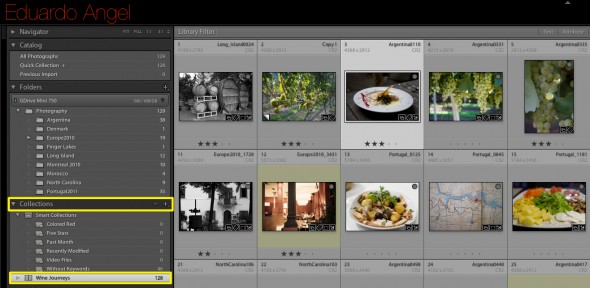
3• Still in the Library Module, create a temporary Collection (it can even be the Quick Collection) for the best images. At this point, don’t worry about enhancing each individual image. You will have time for that later.
Click to keep reading
4• In the Book Module, create an empty (no images) Book Layout. I like to call this the “book’s skeleton.”
For many photographers this step is hard to achieve without adding images, but I strongly recommend the exercise.
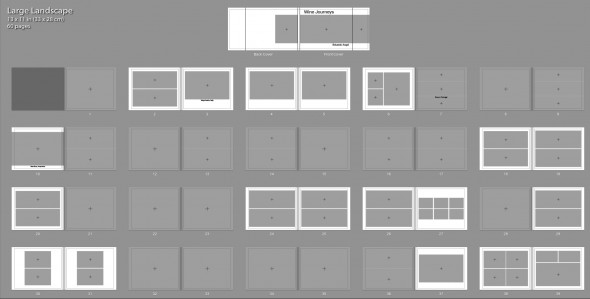
5• Save the empty custom book layout as a Book Collection.
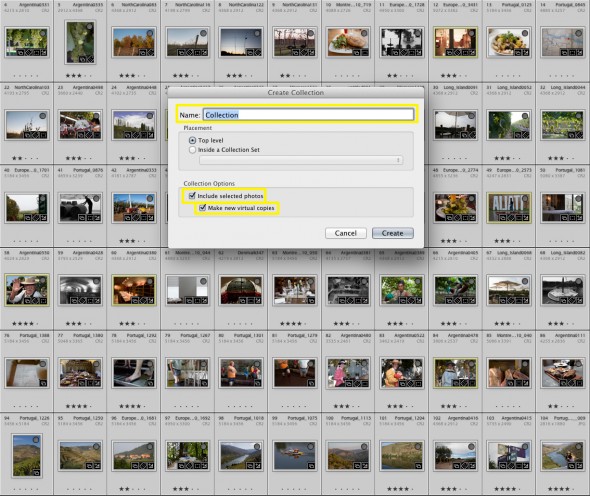
6• Go back to your “best images” Collection and add them to the Book Layout Collection as virtual copies.
7• Here’s where the fun begins. Add images and text to the layout. Most books have a beginning, middle, and end. Constantly consider the “flow” of the story.
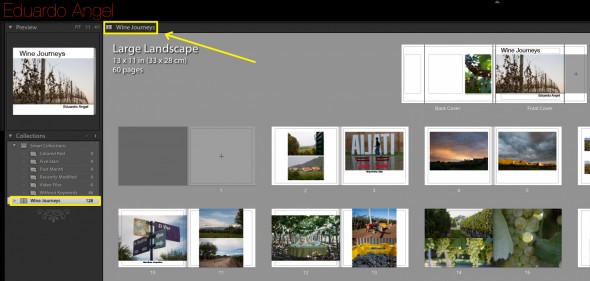
8• Add a great cover image and title. We do judge books by their cover.

9• Once you are happy with the project, take individual images to the develop module for further enhancements.

10• Send your book to Blurb, export it as PDF or print it on your inkjet printer.

If you don’t need all the Adobe Creative Cloud bells and whistles, consider their photography plan which includes Photoshop CC + Lightroom 5 and 20GB of cloud storage for only $9.99/month!

Don’t get bogged down in technical gobbledygook! Learn how to improve your workflow with a virtual one-on-one consulting session.